
|

|
Submitting Movements via HUK
|
Overview
The program will allow you to submit movement information to the BCMS via the HUK
central computer. Whenever a DEFRA official movement event is recorded within the
program, the animals will be placed in a batch. You can view the animals in the
batch and inspect their details before submission takes place.
Follow the instructions in the order that they appear.
To submit movements to the BCMS via HUK proceed as follows:
- Start the 1-Stop Herd Management program if it is not already running
- Move your mouse pointer to the left-hand side of the 1-Stop screen and single left-click
on the Births and Movement Registrations button.
- In the main portion of the 1-Stop screen, click on the Movement
Notifications button
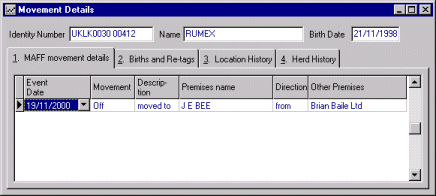
- The outstanding movement batch will be displayed. You can optionally
inspect the details for each animal in the batch double-click on the relevant line and the
Animal Details window will display. Now right-click within the Animal
Details window to display the Movement Details window for that
animal (shown below). Close the window and the Animal Details window when you are
finished
- When you are ready to submit the batch, click on Register all Movements at the
top of the screen.
- The HUK 1-Stop Login Details window will display
- Check your Herd Prefix is correct
- Enter your unique PIN number and click OK
- Your computer will dial up and connect with the HUK system to submit the movements

