Downloading Classification Data from HUK |
The 1-Stop program allows you to download classification data from the Holstein UK database. Once downloaded this information can be viewed in a data grid or on individual animal pedigree reports.
The download process is run from the Data Entry | Pedigree | Classifications menu item. The following screen displays:
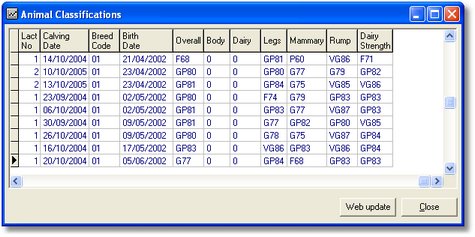
Like with most data grids in 1-Stop Herd Management, you can click the filter button  on the
Toolbar and define a filter for the grid e.g. Alive Cows. Remember though, that this
filter will remain until cleared (even if you exit the program).
on the
Toolbar and define a filter for the grid e.g. Alive Cows. Remember though, that this
filter will remain until cleared (even if you exit the program).
Click the Web update button and you will then be prompted for your HUK PIN number. Once you have connected to the Internet and logged onto the HUK central system, the data download will commence. You will see a message in the program Status bar at the bottom of the screen "Receiving Response". Next the message will change to "Updating Records" and a progress bar will display. The program will finally display a confirmation dialog screen when the whole process is complete.
The data can now be viewed in the grid itself or you can right-click on the grid and select Grid > Preview or Grid > Print. A further option on the Grid menu is to "Export". This will enable you to save the data to a CSV (comma separated value file) which can be opened in any spreadsheet program.
You can also view the updated records by going to Data Entry | Animal Details and then right-clicking on the window to get the short-cut menu. Move your mouse pointer over the Pedigree menu item to reveal several report options. These options show classification data for the animal record that is currently displaying in the Animal Details window. The options are:
|
|